


Meeting Notes Google Sheets Template — All-in-One Meeting Planner
Share
Couldn't load pickup availability
Description
Stop losing track of what was said, what was decided, and what needs to happen next. This Meeting Notes Google Sheets Template gives you a single, structured system to plan, document, and document every meeting; team check-ins, brokerage meetings, coaching sessions, or your own business planning, all in one place.
With an automated calendar, interactive date picker, and a clean single-tab layout, you can log notes, assign action items, and review your full year of meetings at a glance. No scattered notes. No forgotten follow-ups. Just a clear record of every important conversation, year after year.
What's Included
2 Versions of the Template:
- Version 1: Choose your start year. Automatically begins in January. Choose your start day (Sunday or Monday). All 12 monthly calendars update themselves based on the year you select.
- Version 2: Choose your start year, start day (Sunday or Monday), and start month. Full flexibility for how your year is structured.
Key Features
- Automated Calendar Integration: Type a meeting date into your notes and the corresponding day on the mini-calendars highlights automatically — so you can visually track your schedule at a glance.
- Interactive Date Picker: Double-click any date cell for a pop-up calendar to lock in your meeting date instantly.
- Clean Single-Tab Layout: Your entire year of meeting history in one primary view. No toggling between endless tabs.
- Comprehensive Agenda & Notes Section: Generous layout to document agendas and discussion points.
- Attendee Logs: Note who was invited and check off exactly who attended.
- Action Item Tracker: Dedicated columns for task descriptions, due dates, delegated names, and a visual completion checklist.
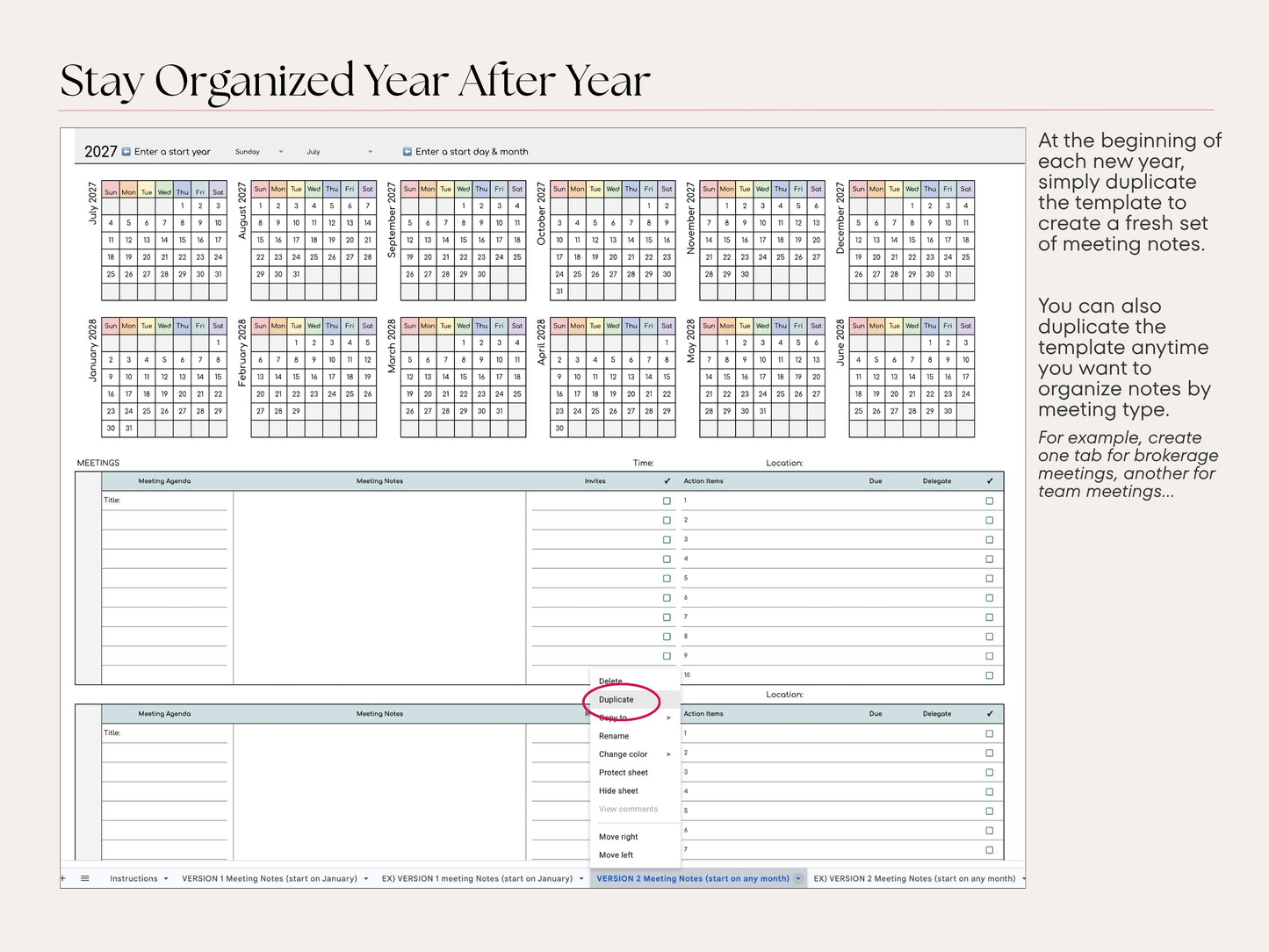
- Duplicate as Needed: Want to keep team meetings separate from brokerage meetings? Duplicate the tab and track them independently.
- Fully Customizable: Add rows, adjust formatting, and tailor the layout to your workflow. Instructions included.
- Multi-Year Use: Reuse it year after year — no rebuilding required.
Requirements: A Google account is required to access and copy the template. Digital download only — no physical product will be shipped.
License & Usage Terms
Individual License: This template is licensed for your personal business use only. Please don't share, redistribute, or resell the files. If your colleagues love what they see, we'd be grateful if you'd send them our way!
Team & Brokerage Licensing: Need licenses for multiple team members? Contact us for volume pricing options - we're happy to work with you!
By purchasing, you agree to our Terms of Service & Policies.
After Purchase
Upon purchase, you will receive a PDF download containing access link(s) to your template. Simply open the PDF, click the link(s) inside, and you'll be ready to start using and customizing your template right away.
Need help? We're always happy to assist! If you have any questions or run into any issues, please don't hesitate to reach out. We're here to make sure you get the most out of your purchase.


-
Professionally Designed
We have a background as a REALTOR® and Transaction Coordinator.
-
Customizable
Edit to suit your business process & brand.
-
Instant Download
All products are instant downloads. Receive them immediately after purchase.
-
Support
Have a questions? We are always happy to help.
-
Lifetime Usability
Use your templates for as long as you need.